Invideo AI for Faceless YouTube Videos: Create Content Without a Camera
Educational channels, technology channels, history channels, business channels and many other creators can produce videos without showing their faces.
This is where Invideo AI Faceless Videos can be useful.
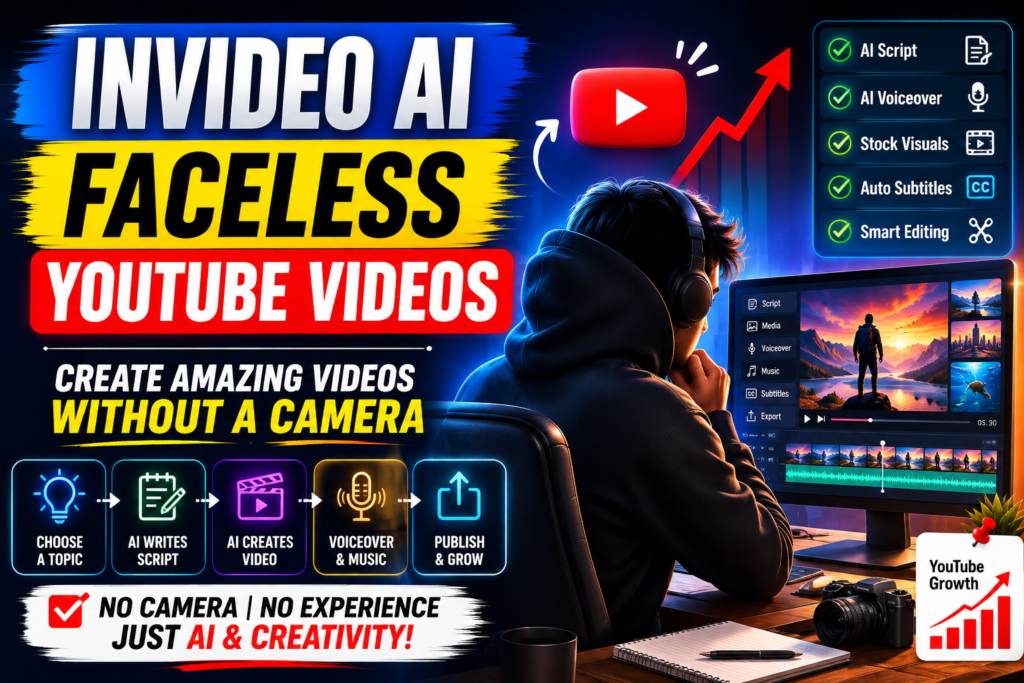
Invideo’s current faceless-video tool can generate a video from a prompt by creating a script, selecting media, adding voiceover, music and other elements.
What Are Faceless YouTube Videos?
Faceless YouTube videos are videos where the creator does not need to appear on camera.
Instead, the video can use:
- Stock footage
- AI-generated visuals
- Screen recordings
- Animations
- Text
- Voiceovers
- Background music
- Subtitles
This format can be useful for creators who prefer to focus on information and storytelling rather than appearing on screen.
How Invideo AI Creates Faceless Videos
Creating Invideo AI Faceless Videos can start with something as simple as a topic idea.
For example, a creator could enter:
“Create a 5-minute YouTube video explaining how artificial intelligence is changing small businesses.”
Invideo can then generate a script and build a video around the topic. Its official faceless-video workflow describes a process of prompting, generating, editing with Magic Box and publishing.
1. AI Script Generation
Writing a complete YouTube script can take considerable time.
Invideo AI can generate scripts based on a topic and the creator’s instructions.
You can specify things such as:
- Video topic
- Audience
- Video length
- Tone
- Language
- Style
The creator can then review and modify the generated script.
2. Automatic Visual Selection
A good faceless video needs visuals that match the narration.
Invideo’s faceless-video tool says it can search through its large stock-media library and select relevant images and videos for scenes.
This can reduce the amount of time spent searching for footage manually.
3. AI Voiceovers
A faceless channel still needs narration.
Invideo provides AI-generated voiceovers with different voices, languages and accents.
This allows creators to produce narrated videos without recording their own voice.
4. Background Music
Music can help establish the mood of a video.
Invideo can add background music and sound effects as part of the automated video-generation workflow.
Creators can then adjust the result if the music doesn’t fit their content.
5. Automatic Subtitles
Subtitles can make videos easier to follow, especially for viewers watching without sound.
AI can generate captions based on the narration, reducing the need to manually type every line.
6. AI Video Editing
One of the useful features for beginners is AI-assisted editing.
Invideo’s Magic Box allows users to give text commands to modify their videos, including changing voiceovers, deleting scenes and adjusting other elements.
This means creators can describe the change instead of manually navigating through a complex editing timeline.
7. YouTube Shorts and Long-Form Content
Faceless content isn’t limited to long YouTube videos.
Invideo’s faceless-video tool can be used for different formats, including YouTube Shorts and other social-media videos.
Creators can therefore adapt the same content idea for multiple platforms.
8. Different Topics
One of the biggest advantages of the faceless format is the variety of possible topics.
Creators can produce videos about:
- Technology
- AI
- History
- Business
- Education
- Travel
- Science
- Finance
- Motivation
- Gaming
The quality of the final video will still depend on the script, visuals, editing and accuracy of the information.
9. No Camera or Studio Required
Traditional YouTube production may require:
- Camera
- Microphone
- Lighting
- Recording space
- Video editing software
With Invideo AI Faceless Videos, creators can produce certain types of content without setting up a physical recording studio. Invideo specifically markets its faceless workflow as requiring no camera or recording equipment.
10. AI Avatars as an Alternative
Faceless does not always mean that a video must contain only stock footage.
Invideo also provides AI avatars, including virtual actors and digital versions of users.
This gives creators another option: instead of appearing on camera themselves, they can use an AI presenter.
Create Videos in Multiple Languages
Creators targeting international audiences can also use AI-generated voiceovers and multilingual workflows.
This can make it easier to adapt a single idea for audiences in different languages.
However, translations and pronunciation should always be reviewed before publishing.
Can Faceless Videos Be Monetized?
A faceless channel can potentially qualify for YouTube monetization if it meets YouTube’s eligibility requirements and follows its policies.
Simply using AI does not guarantee monetization.
Creators should focus on producing original, useful and engaging content rather than simply generating large quantities of repetitive videos.
Important Things to Remember
AI can make video production easier, but creators should still check every video before publishing.
Pay particular attention to:
- Factual accuracy
- Copyright
- Voice quality
- Visual relevance
- Repetitive content
- Misleading information
- YouTube policies
AI-generated content should be treated as a production tool, not as a substitute for quality control.
The Future of Faceless YouTube Content
AI is making it easier for individuals and small teams to produce video content.
Invideo’s newer AI filmmaking approach goes beyond one-click generation by using AI agents to help with scripting, storyboarding, generating shots and editing, while routing work across 200+ AI models.
This could make sophisticated video production accessible to creators who previously needed a larger production team.
Final Thoughts
Invideo AI Faceless Videos offer creators a way to produce YouTube content without appearing in front of a camera.
From script generation and visual selection to AI voiceovers, music, subtitles and editing, Invideo can handle many parts of the production process.
The most successful creators will still need strong topics, original ideas, accurate information and good storytelling.