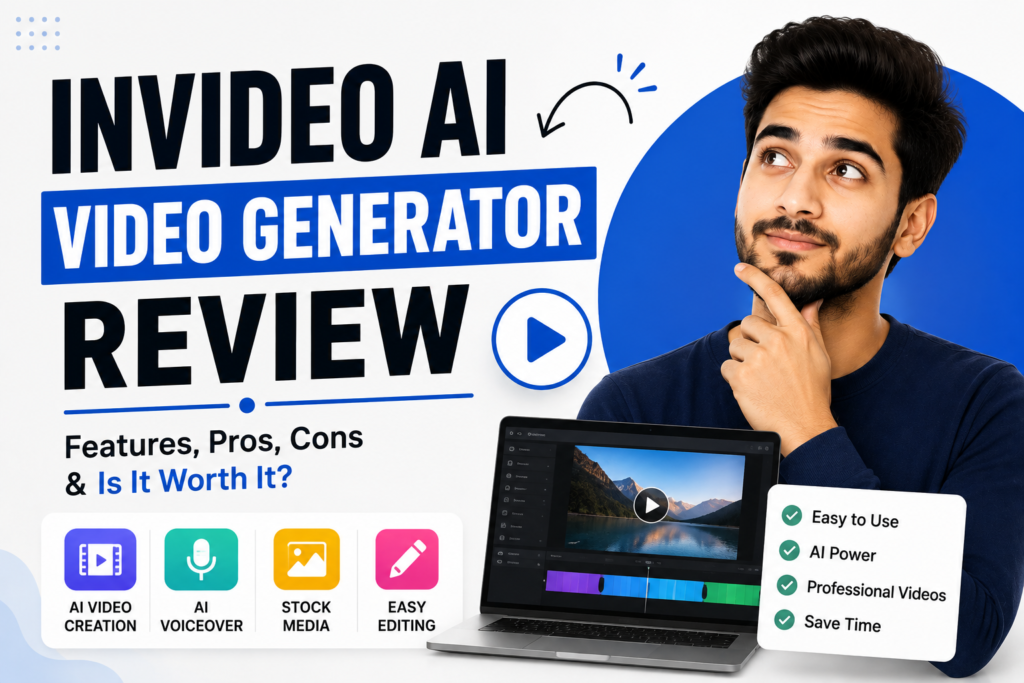
InVideo AI Video Generator Review 2026: Can AI Really Replace Hours of Video Editing?
Creating high-quality video content used to be expensive and complicated.
You needed a video editor, scriptwriter, voice artist, stock footage, background music, animation skills, and plenty of time.
Today, AI is changing that entire process.
One of the platforms pushing this technology further is InVideo AI.
In this detailed InVideo AI video generator review, we’ll look beyond the basic features and examine what makes the platform different in 2026, its AI filmmaking capabilities, pricing, strengths, weaknesses, and whether it’s actually worth your money.
Try InVideo AI Video Generator
What Is InVideo AI?
InVideo AI is an online AI-powered video creation and editing platform that allows users to create videos from text prompts, scripts, ideas, and instructions.
Its current AI video generator can write scripts, select or generate visuals, add voiceovers, subtitles, music, and other elements. It also lets users make changes through text commands instead of manually editing every part of a timeline.
But InVideo has evolved beyond being a simple “text-to-video” tool.
Its newer agentic workflow is designed to behave more like an AI production team, handling tasks such as script breakdown, storyboards, character references, shot generation, voices, and music while maintaining context throughout a project.
That is what makes the platform particularly interesting in 2026.
Why InVideo AI Is Different
Many AI video generators work like this:
Write prompt → Generate clip → Start again.
The biggest problem is consistency.
Your character may look different in the next scene.
The location may change.
The visual style may suddenly look completely different.
You may have to explain the same thing repeatedly.
InVideo’s Agent One takes a different approach.
It can maintain project context across scenes, including characters, locations, visual rules, and other instructions.
In simple words:
You give the AI a creative direction, rather than treating every scene as a completely separate generation.
That can make a huge difference when you’re creating longer or more complicated videos.
InVideo AI Video Generator Review: What Can You Create?
The platform can be used for many different types of content.
YouTube Videos
You can create:
- Faceless videos
- Educational videos
- Explainers
- Tutorials
- Storytelling videos
- Product reviews
- List videos
- Business content
Short-Form Videos
You can also create content for:
- YouTube Shorts
- TikTok
- Instagram Reels
Marketing Videos
Businesses can use AI video creation for:
- Product advertisements
- Promotional videos
- Social media campaigns
- Explainer videos
- Product demonstrations
- Brand videos
- Sales content
InVideo also offers an Advertising Studio designed around creating professional advertising videos.
The Biggest Feature: Agent One
If you’re testing InVideo in 2026, this is probably the feature you should pay the most attention to.
InVideo’s Agent One is designed as an agentic AI filmmaking system.
Instead of simply generating a video from one prompt, it can break a project into multiple production tasks.
According to InVideo, the agent can handle:
- Script breakdown
- Character sheets
- Storyboards
- Shot generation
- Voice
- Music
- Scene planning
- Visual consistency
It can also use multiple specialized agents for larger productions.
Think of it like having an AI production crew.
You provide the vision.
The AI helps handle the production.
That’s a much bigger concept than simply asking AI to “make me a video.”
200+ AI Models in One Platform
Another major advantage is that InVideo brings a large collection of AI models into one workspace.
Its current documentation says users can access more than 200 AI models for video, images, audio, and music.
The platform currently lists models including:
- Veo
- Kling
- Seedance
- Nano Banana
- GPT-based image generation
- ElevenLabs music
This means you don’t necessarily need to maintain separate accounts across numerous AI platforms just to experiment with different models.
InVideo can act as a centralized creative workspace.
AI Voiceovers Make Faceless Videos Easier
You don’t need to record your own voice for every video.
InVideo provides AI voiceovers with different voices, languages, and accents.
Its AI video generator currently advertises human-sounding voiceovers in more than 50 languages.
This makes the platform particularly useful for:
- Faceless YouTube channels
- Educational channels
- Business videos
- Social media content
- International content
- Product videos
For creators who don’t want to appear on camera, this can remove one of the biggest barriers to video production.
16 Million+ Stock Photos and Videos
AI-generated visuals aren’t always the best option.
Sometimes you simply need authentic footage.
InVideo’s platform currently advertises access to more than 16 million stock photos and videos.
This gives creators another option:
AI-generated visuals + stock footage + AI voice + music
all inside one workflow.
For business videos and educational content, that combination can be extremely useful.
Edit Videos With Text Commands
Here’s another feature beginners will appreciate.
Traditional video editing means dealing with timelines, tracks, cuts, transitions, audio levels, effects, and other editing controls.
InVideo’s Magic Box lets users give editing instructions using text.
For example:
“Delete the second scene.”
“Change the voiceover.”
“Add a stronger introduction.”
“Change the accent.”
The platform then applies the requested change.
This doesn’t mean traditional editors are suddenly unnecessary.
But it makes video editing much more accessible to beginners.
Is InVideo AI Good for YouTube?
For many creators, yes.
Especially if your biggest problem is production time.
A YouTube creator can use InVideo to go from:
Topic → Script → Visuals → Voice → Editing → Final Video
without having to manually handle every stage.
This is particularly attractive for faceless channels.
But there is an important warning:
AI-generated videos don’t automatically become successful YouTube videos.
You still need:
- A strong topic
- A clickable title
- A compelling thumbnail
- Good storytelling
- Audience retention
- Original ideas
- Consistent publishing
AI can help you produce the video.
It cannot guarantee viewers.
Is InVideo AI Good for Business?
This may be one of its strongest use cases.
Imagine you’re launching a new product.
Instead of waiting days for a video editor, you could create several versions of your promotional content.
For example:
Product advertisement
15-second social media Reel
30-second promotional video
YouTube product explanation
Customer-focused explainer
Website promotional video
One idea can become multiple pieces of content.
For small businesses, that can be incredibly valuable.
InVideo AI for E-Commerce
E-commerce businesses constantly need fresh visual content.
A product page might need a video.
A Facebook campaign might need another.
Instagram might need a Reel.
TikTok might need a short product demonstration.
Instead of producing every video completely from scratch, AI can help create variations.
InVideo’s current product-video workflow allows users to add product details, select an AI actor, customize the script and language, and export the finished video.
This makes it particularly interesting for online stores.
What About Pricing?
This is where you need to pay attention.
InVideo offers a free option, but the free plan is limited.
Its current paid pricing includes:
- Plus: $17/month when billed annually
- Max: $83/month when billed annually
- Generative: $167/month when billed annually
Higher tiers are available for heavy users and enterprise-style production.
The Plus plan currently includes 75 credits per month, while Max includes 390 credits.
The exact credit cost depends on the model and generation you use.
And there’s an important detail:
Unused credits don’t roll over to the next month.
So if you’re a heavy AI-video creator, you should understand the credit system before choosing a plan.
Is InVideo AI Expensive?
Compared with basic video editors, yes.
But price needs to be judged against the amount of work you’re replacing.
If you’re using it occasionally to create one simple video, the cost may not make sense.
But if it replaces hours of:
- Script writing
- Video research
- Voice recording
- Editing
- B-roll searching
- Scene creation
- Subtitle creation
then the value can be much higher.
What I Like About InVideo AI
1. Extremely Broad Feature Set
It combines video generation, image generation, voiceovers, editing, stock media, and AI models in one platform.
2. Beginner-Friendly
You don’t need to be a professional editor to start creating.
3. Agent One Is Powerful
The ability to maintain context across a project is one of its most interesting features.
4. Great for Content Volume
If you’re trying to publish consistently, AI-assisted production can save a lot of time.
5. Useful for Businesses
Marketing teams can create different versions of promotional content without starting from zero every time.
What I Don’t Like
1. Pricing
The platform can become expensive for heavy users.
2. Credits
You need to monitor your credit usage carefully.
3. Generation Time
TechRadar found InVideo’s generation process noticeably slower than some competitors during testing, although the reviewer considered the output quality worth the wait.
4. AI Still Needs Direction
The more complicated your project is, the more important your instructions become.
InVideo itself recommends providing detailed context to its agent because more information can improve the resulting output.
So don’t expect:
One sentence → Hollywood movie.
Professional results still require creative direction.
InVideo AI vs Traditional Video Editing
Let’s make the difference simple.
| Traditional Workflow | InVideo AI |
|---|---|
| Write script manually | AI-assisted script |
| Find footage manually | AI + stock media |
| Record voice | AI voice |
| Edit timeline | AI-assisted editing |
| Search for music | AI-assisted music |
| Create scenes manually | AI generation |
| Re-edit manually | Text instructions |
Traditional editing still gives you enormous control.
But AI dramatically reduces the amount of manual work required.
That’s the real advantage.
Who Should Use InVideo AI?
I’d recommend considering it if you’re:
A YouTuber who wants to publish more frequently.
A faceless creator who doesn’t want to record videos.
A business owner who needs promotional content.
A social media manager managing multiple platforms.
A marketer producing advertisements.
An e-commerce seller creating product videos.
A freelancer producing videos for clients.
A content agency handling multiple projects.
If video production is consuming too much of your time, InVideo becomes much more interesting.
Who Should Avoid It?
You may not need InVideo if you:
- Create videos very rarely
- Already have a professional editing team
- Need complete manual control over every frame
- Don’t need AI generation
- Only make very simple videos
In those situations, another editing solution may be more practical.
Is InVideo AI Actually Worth It?
After looking at the current features, pricing, and independent testing, I would say:
Yes—but mainly for people who will actually use its advanced capabilities.
TechRadar rated InVideo as a professional-grade AI generation and editing platform and particularly praised Agent One’s conversational workflow.
The platform isn’t trying to be just another basic template editor.
It’s increasingly positioning itself as an AI production environment.
That distinction matters.
If you’re creating serious content regularly, the ability to manage scripts, scenes, characters, models, voices, visuals, and editing in one environment can be extremely valuable.
The Bigger Opportunity
Here’s what makes AI video exciting.
You don’t have to think of AI as a replacement for creativity.
Think of it as a production multiplier.
Before AI:
1 idea → 1 video → hours of work
With AI:
1 idea → multiple concepts → multiple videos → multiple platforms
You can test different hooks.
You can create different versions of advertisements.
You can turn articles into videos.
You can transform product descriptions into promotional content.
You can create content for several platforms from one central idea.
That’s where the real business value starts appearing.
Want to Use AI Without Doing Everything Yourself?
Here’s the problem many businesses face.
They know AI is powerful.
They know video marketing works.
They know they should create more content.
But they don’t have the time to learn every AI tool.
That’s completely understandable.
You can explore AI-powered digital solutions and professional assistance through:
Instead of spending countless hours figuring out which tools to use, how to create content, and how to turn AI into a marketing system, you can get professional help focused on your actual business goals.
Final Verdict
This InVideo AI video generator review makes one thing clear:
InVideo has evolved far beyond a simple AI video maker.
Its combination of AI generation, 200+ models, stock media, AI voices, text-based editing, and Agent One makes it one of the more ambitious AI video platforms available in 2026.
It’s not perfect.
The pricing is relatively high.
Credits need to be managed.
Generation can take time.
And you still need good creative direction.
But if your goal is to produce more professional video content with less manual work, it’s absolutely worth testing.
Start Creating With InVideo AI
Conclusion
The future of video production isn’t simply about replacing editors with AI.
It’s about giving creators access to an entire production workflow without requiring a huge team.
That’s what makes InVideo AI interesting.
You can start with an idea and progressively turn it into a script, storyboard, scenes, visuals, voices, music, and a finished video.
For creators, marketers, entrepreneurs, and businesses, that can mean less time spent on repetitive production and more time spent on ideas that actually matter.
If you want to experiment with AI video creation, start by testing the platform yourself.
And if you want to go beyond simply using AI tools and actually build an AI-powered content and marketing strategy, professional assistance can make the process much easier.